Tactile Signs vs Braille Signs: What Project Buyers Need to Know
News Details
Selecting accessible signage for commercial properties or architectural builds requires careful attention to detail. Navigation must remain effortless for every visitor entering a facility. Project managers, general contractors, and procurement officers often navigate precise requirements when specifying compliant displays.
Two critical concepts appear constantly during project planning: tactile displays and Braille elements. While many people use these terms interchangeably, they refer to distinct features that serve different purposes. Knowing how these components work together will help you source compliant products, pass building inspections, and improve wayfinding throughout your facility.
Defining the Core Concepts
Understanding accessible signage begins with identifying the physical details of each sign type. Both types rely on touch, yet they present information using completely different methods.
Tactile displays feature raised characters, symbols, or pictograms that users read by running their fingers across the surface. These elements lift off the backing plate to create a tangible profile. Visually impaired users who do not read Braille often rely on raised letters to identify room names or numbers.
Braille displays feature raised dot patterns known as Grade 2 Braille. These contracted dot cells represent entire words, common letter combinations, or single letters. Braille allows proficient readers to gather room information quickly through touch.
In practical application, compliant ADA signs combine both tactile letters and raised Braille dots on a single sign assembly.
Key Differences: Tactile Signs vs Braille Signs
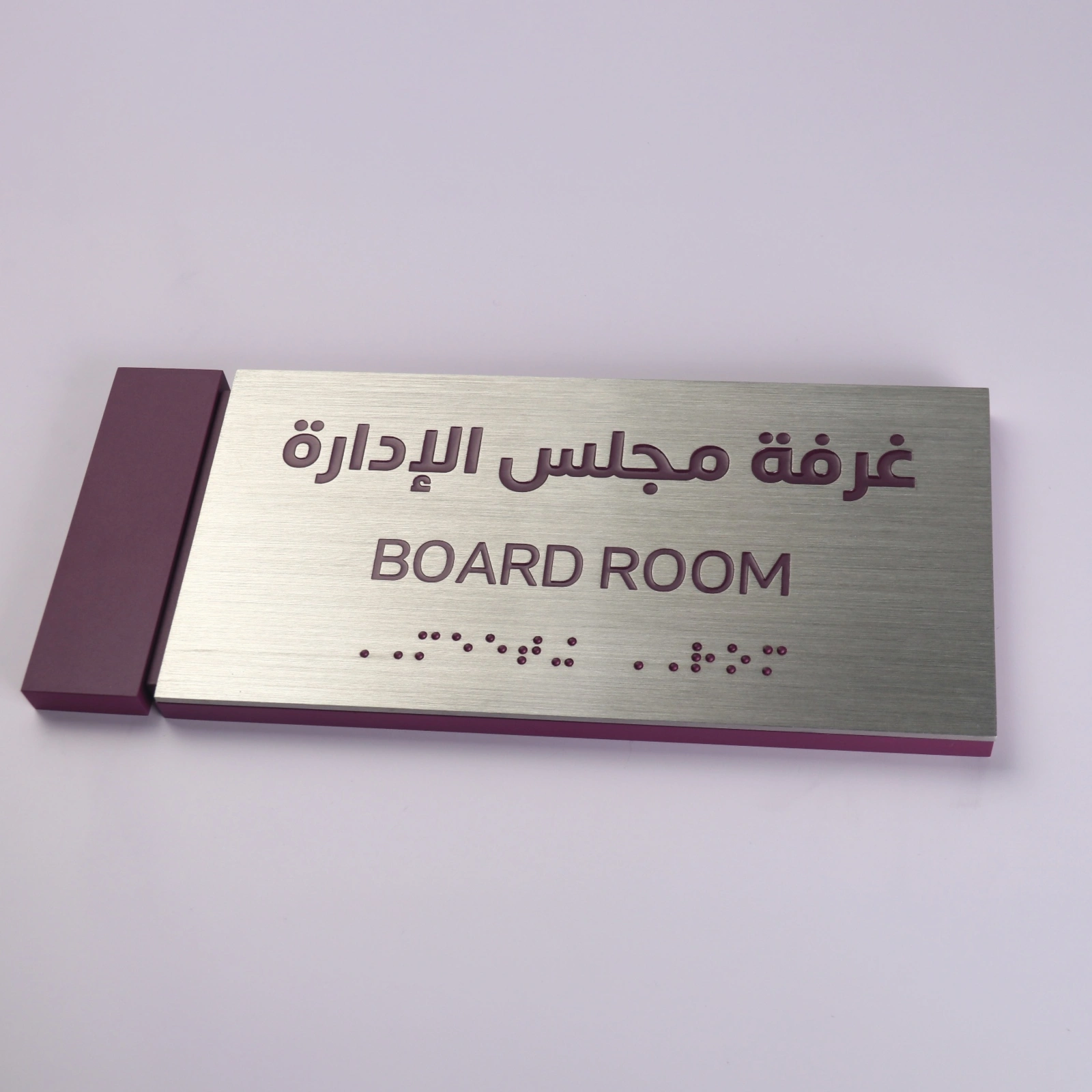
To select the right wayfinding products for your building, compare these key differences across design, audience, and regulatory function:
| Feature | Tactile Elements | Braille Elements |
| Primary Audience | People with low vision or non-Braille tactile readers | Individuals who are blind and read Grade 2 Braille |
| Physical Form | Raised characters, numbers, and visual pictograms | Raised dome dot clusters directly below text |
| Visual Function | High contrast, clear lettering for visual reading | Tactile dots positioned specifically for touch |
| Profile Height | Raised characters lifted at least 1/32 inch | Raised dots measure 0.025 to 0.037 inches in height |
| Font Style | Uppercase sans-serif fonts with clean edges | Standardized dot spacing and height guidelines |
Meeting ADA Signs Compliance Standards
Navigating accessibility regulations can feel complex, but adhering to baseline standards ensures your property remains compliant and open to everyone.
-
Raised Characters Placement: Letters must feature a minimum height of 5/8 inch and a maximum height of 2 inches. They must feature a uppercase sans-serif font without excessive decorative styling.
-
Braille Position: Braille must sit directly below its corresponding text. If the sign includes a pictogram, the Braille must sit below the text, outside the pictogram field.
-
Color Contrast: High contrast between text and background improves legibility for individuals with partial vision. Non-glare finishes prevent light reflection from obscuring message details.
-
Installation Height: Signs must hang at a set height, typically between 48 inches and 60 inches from the finished floor, measured to the baseline of the raised lettering.
Selecting Non-Illuminated Signage and Specialty Letters
Every building zone serves a different purpose, so matching your accessible signage with your interior design creates a unified look across the site.
For permanent rooms like restrooms, utility spaces, and emergency exits, non-illuminated signs provide a dependable choice. These non-lit panels deliver clean aesthetics, high durability, and easy installation while keeping your space clear and easy to navigate.
In high-traffic areas, lobbies, or corporate suites, visual branding matters just as much as functional wayfinding. High-end architectural accenting, such as custom freestanding stainless steel letters, creates strong brand presence at main entrances and reception desks. Combining custom architectural metal letters for major entrance branding with fully compliant, surface-mounted raised characters for interior room doors gives your project a balanced, professional look.
Sourcing Direct from River Stone
Ordering directly from experienced manufacturers helps you protect your project timeline and control material costs. Working with specialized suppliers like River Stone simplifies procurement in several ways:
-
Material Quality: Premium materials like solid acrylic, brushed metal, and high-impact composites stand up to daily cleaning and physical wear.
-
Precision Fabrication: Advanced CNC cutting and laser finishing ensure crisp, smooth raised characters that are comfortable to touch.
-
Regulatory Accuracy: Accurate Braille dot spacing, character height, and stroke thickness prevent costly re-orders caused by inspection failures.
-
Streamlined Ordering: Sourcing both architectural branding elements and compliant room signs from one supplier reduces shipping delays and vendor management overhead.
Focusing on tactile signs vs Braille signs early in your planning phase helps you meet building codes while maintaining high design standards across every floor. Explore available options on River Stone to find direct factory solutions for your upcoming facility expansion or commercial build.


